



You’re probably here because you’ve heard Moz Pro talked about for years and you’re wondering: is Moz Pro still legit in 2026, or is it just living off its old reputation?
Here’s the short answer so you don’t have to scroll:
- Moz Pro is legit – trusted data, clean UX, and solid core SEO tools.
- It’s not the most advanced or feature-packed suite anymore.
- It’s best for marketers and teams who want reliable SEO fundamentals over bleeding-edge bells and whistles.
Not sure how this tool compares to alternatives?
Explore our interactive comparison tool to see pricing,
capabilities, and best-fit use cases side-by-side →
Quick Moz Pros & Cons (so you can sanity-check fast)
Pros
- Very user-friendly interface – easy for non-SEO specialists
- Trusted metrics (Domain Authority, Page Authority) and reliable data
- Strong keyword research and site audit for day-to-day SEO
- Clear, actionable recommendations instead of vague scores
- Great educational content baked into the product
Cons
- Pricing can sting for freelancers and small teams
- Rank tracking is only updated weekly on standard plans
- Keyword database isn’t as deep for obscure/long-tail queries
- Local SEO is solid but not best-in-class
- Can feel limited if you’re used to Ahrefs or Semrush-level depth
Now, let’s break down what Moz Pro actually does, how it fits into your workflows, what it really costs, and which Moz Pro alternatives might suit you better.
How I Tested Moz Pro
To test Moz Pro, I set up a real campaign on a free trial of the Medium plan (it lasts from 7 days from the date you sign up). From there, I went through the platform all the way:
- analyzed domain overview
- built out a keyword list and tracked it
- ran competitor research to see how the True Competitor and Keyword Gap tools held up
- pulled a full site crawl
- dug into Link Research to check the backlink data, etc
Additionally, I checked user feedback on platforms like Trustpilot and G2, to get the full picture of what Moz has to offer beyond my own testing.
What is Moz Pro
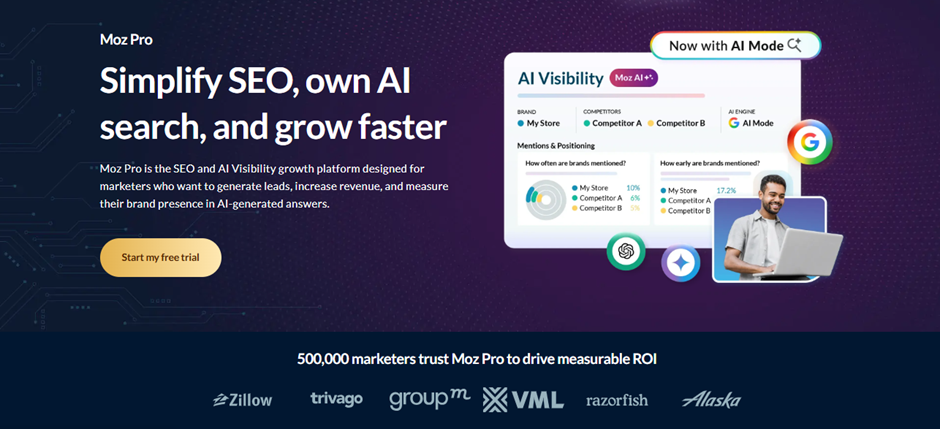
Moz Pro is one of the most respected names in SEO, and it has set the standard other tools measure themselves against since almost the beginning of the industry itself.
The platform, available only through web, serves as your home base for:
- Finding keywords worth targeting
- Tracking how your rankings move over time
- Spotting technical problems on your site
- Understanding and improving your backlink profile
Moz has been around since 2004 (back when it was called SEOmoz), and it’s still run out of Seattle with a huge community behind it.
Moz Academy, the Beginner’s Guide to SEO, Whiteboard Friday; a huge chunk of the SEO industry learned the basics from Moz’s free content long before ever paying for the software.
Today, truthfully, Moz Pro isn’t the most powerful data terminal on the market anymore. Semrush and Ahrefs have both pulled ahead on raw data and scale, however, Moz still holds its own with a handful of features worth walking through.
Setup and Interface
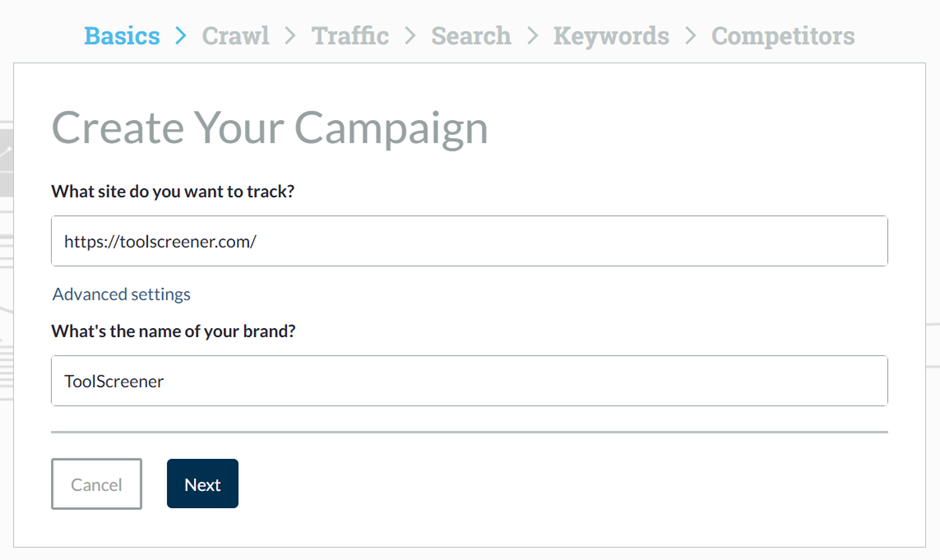
Setting up an account in Moz Pro is pretty simple. When I signed up as a first-time user, it asked a few questions related to my current role, SEO goals, and company details. Then, it had me enter the site URL and brand I wanted to track.
From there, I started to build my first campaign, a process which took only a few minutes. (Also, I did get two emails from Moz along the way during setup.)
After completing all the steps, I landed on the main Moz dashboard. All features sit in the left-handed menu, including:
- AI Research
- Domain Overview
- Competitive Research
- Keyword Research
- Link Research
- On-Page Grader
- On-Demand Crawl
- Rank Checker
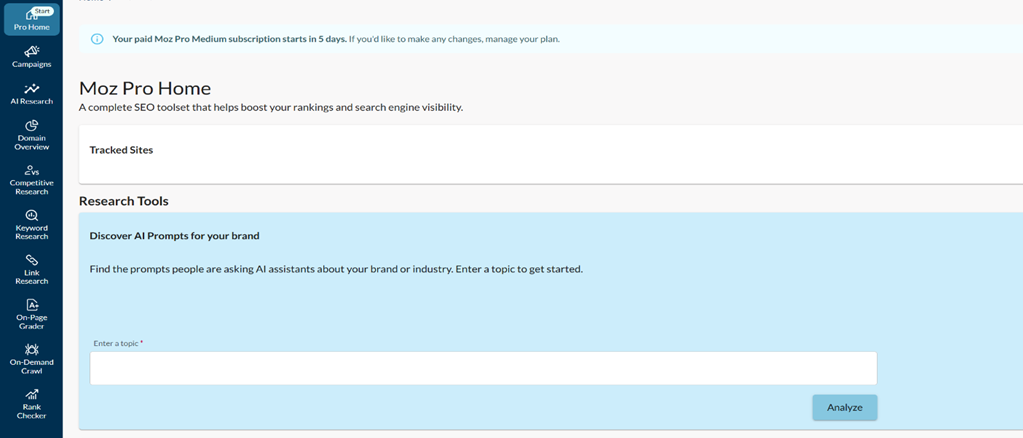
Overall, Moz’s interface is clean, campaign-centric, and beginner-friendly. However, it does feel a bit outdated compared to other providers, like Semrush, as it still leans on dense tables and raw numbers more than the cleaner, graph-forward.
So, expect a bit of scrolling, and less at-a-glance visual polish.
Moz Review of Features
To put Moz through an in-depth test, I created a campaign for ToolScreener and used it to explore main features (keyword rankings, competitors, site issues, backlink data etc). Let’s go through each one of them step-by-step.
AI Research
This is a new layer of the platform, and it’s clearly where Moz is trying to stay relevant as search shifts toward AI-generated answers. Two are the tools here: AI Visibility, and Prompt Suggestions.
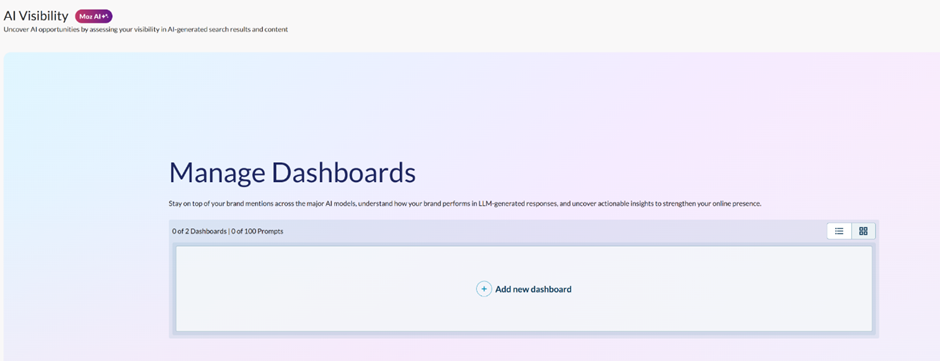
AI Visibility
With AI visibility, you can stay ahead of your competitors, by checking how your content is performing in LLM-generated responses. To set it up, you’ll have to configure your brand terms, competitors, and prompts for AI visibility tracking.
AI models used for brand tracking include ChatGPT, Google AI Mode, and Gemini.
Prompt Suggestions
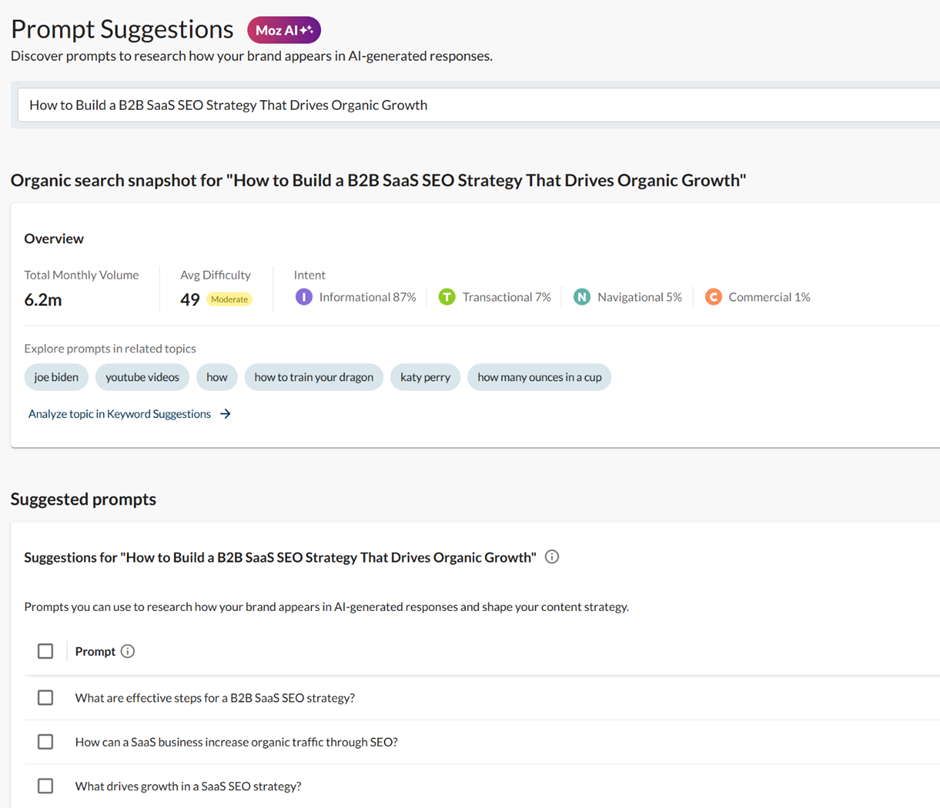
In Prompt Suggestions, if you enter a topic, Moz will find prompts people are asking AI assistants related to your brand or industry.
Monthly volume, average difficulty, and search intent data shows up. You’ll also see a list of suggested prompts from Moz, that you can use a reference to improve your content strategy.
Domain Overview
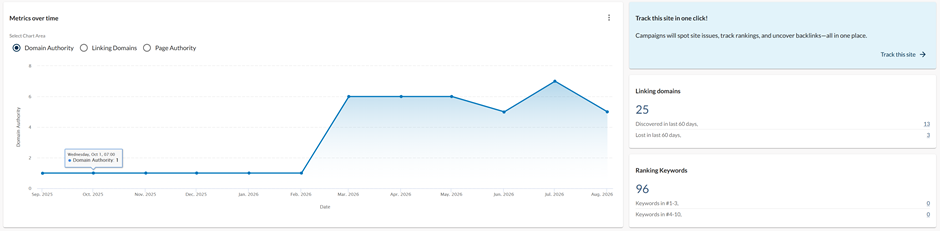
Domain Overview is one of the tools Moz users rely on the most, and it’s basically your at-a-glance snapshot of a site’s SEO health.
You can type in any domain, select its type, and choose your market among those available (Moz’s coverage here is limited to the US, UK, Canada, and Australia), then hit Analyze.
As a result, you’ll get the website’s Domain Authority score, top-ranking pages, top organic keywords, and a rough competitive comparison against other domains.
Domain Authority
This is thee metric Moz built its reputation on, and it’s still calculated from Link Explorer’s backlink data run through a machine learning model.
It’s a 0-100 prediction of how likely a domain is to rank, not a direct ranking factor Google itself uses.
Brand Authority
Brand Authority estimates a brand’s overall strength and influence on a 1-100 scale. It’s available across Domain Overview, SERP analysis, and the Moz API.
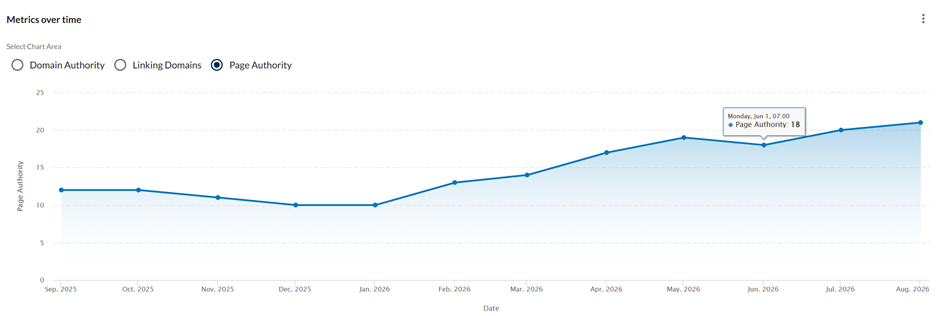
Page Authority
Same idea as Domain Authority, just scoped down to a single URL instead of the whole domain. Moz runs it through the same Link Explorer data and scoring model to predict how a specific page is likely to perform on Google’s results.
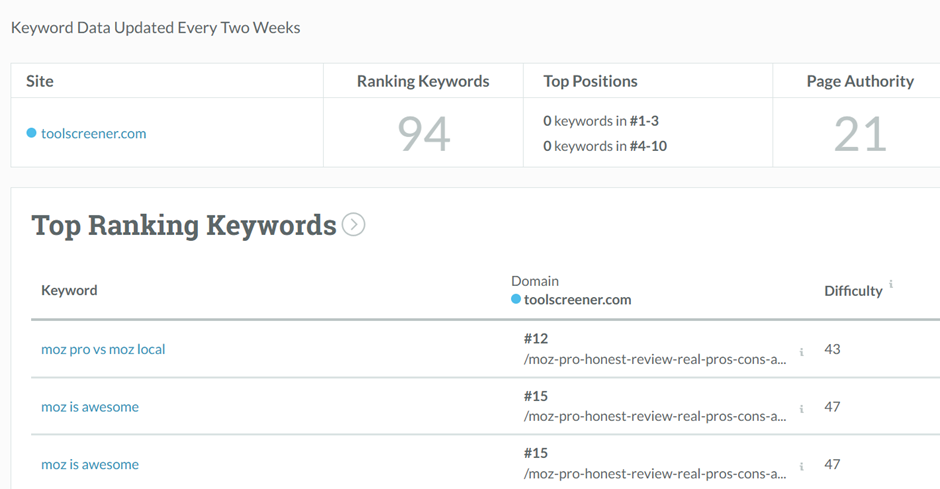
Ranking Keywords
If you scroll further down, you’ll come across top-ranking keywords for your domain.

To see keyword rankings in more depth, simply click on “View all in Keyword Research”. Moz drops you straight into the Keyword Explorer tool with the full list, which is a nice bit of workflow design since you don’t have to copy domain names between tabs to dig deeper.
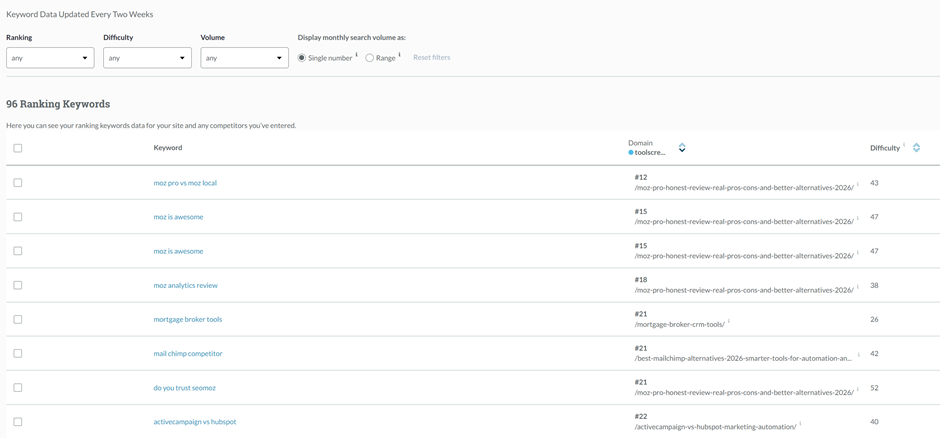
Taken as a whole, Domain Overview earns its spot as (potentially) the first stop in a Moz Pro session. The data is useful, and I liked how main metrics on the page send you to a dedicated tool for more detail.
There’s a limit, however. The monthly query cap on the Standard plan runs out faster than you’d expect if competitor research is a regular part of your workflow. So, keep that in mind if you’ve got a handful of client reports to prepare each month.
Competitive Research
Competitive Research splits across three tools: True Competitor, Keyword Gap (new feature), and Top Competing Content. Here’s how they differ from each-other:
True Competitor
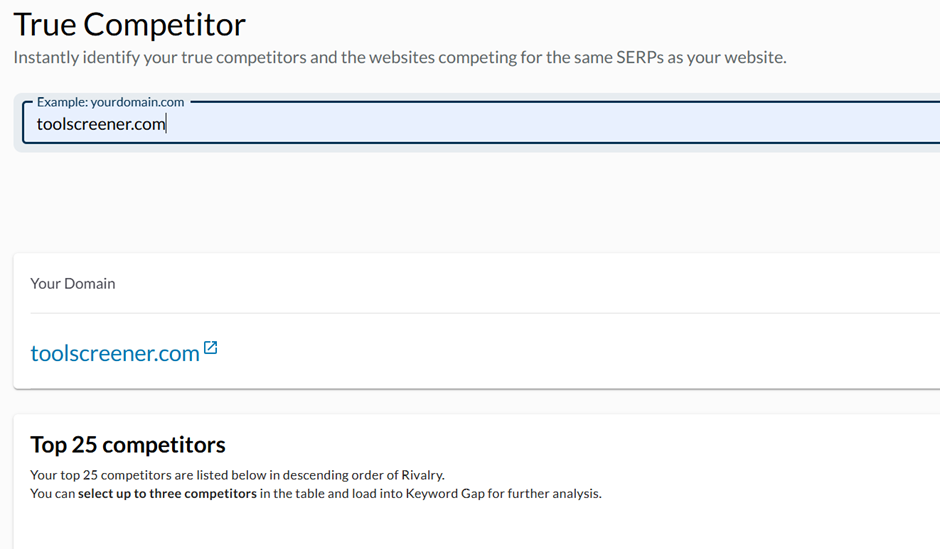
It surfaces your real organic rivals using Domain Authority, keyword Overlap (the percentage of keywords you and a given site both rank for), and a Rivalry score from 1 to 100 that combines the two with search volume.
While the tool itself is helpful, I think Ahrefs and Semrush both filter this kind of false positive out more cleanly.
Keyword Gap
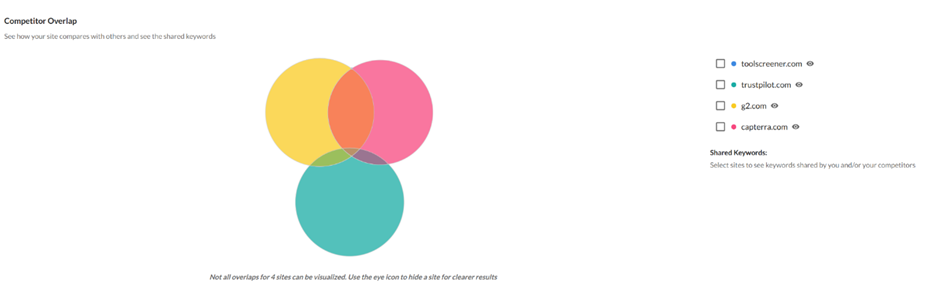
This is Moz’s newer addition to this category, and it does what the name suggests. It shows you keywords a competitor ranks for that you don’t.
You can enter up to three competitor URLs to see how your site stacks up against them, and once the data’s in, Moz generates a colorful graph to help you visualize the comparison.
Top Competing Content
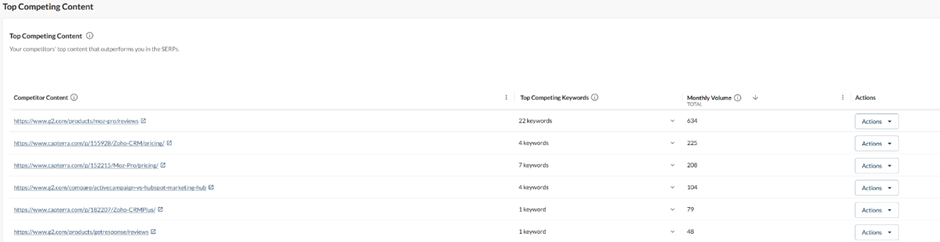
This tool rounds things out by showing the pages driving a competitor’s rankings for the shared keywords you’re both targeting.
You get the URLs directly, so you can open the page, see what others are doing differently, and build your own content version stronger.
Keyword Research
This is the typical metric marketers spend most time on. Its main features include everything from overview to keyword suggestion to briefing content with AI.
You can do a thorough analysis of competitors here, to help you put your content into perspective so you can fill all the missing gaps and strive for better ranking.
Keyword Overview
You plug in a topic or seed keyword, and Moz Pro’s Keyword Explorer shows you:
- Search volume
- Difficulty score (how hard it’ll be to rank)
- Organic click-through rate (how many clicks are actually available)
- Related keywords and questions
You use this to build content plans, prioritize topics, and avoid chasing impossible keywords.
Keyword Suggestions
This feature was, in fact, enjoyable to use. Moz shows up related terms, question-based keywords, and keywords tied to similar SERPs, each one sortable by relevancy, volume, difficulty, and search intent.
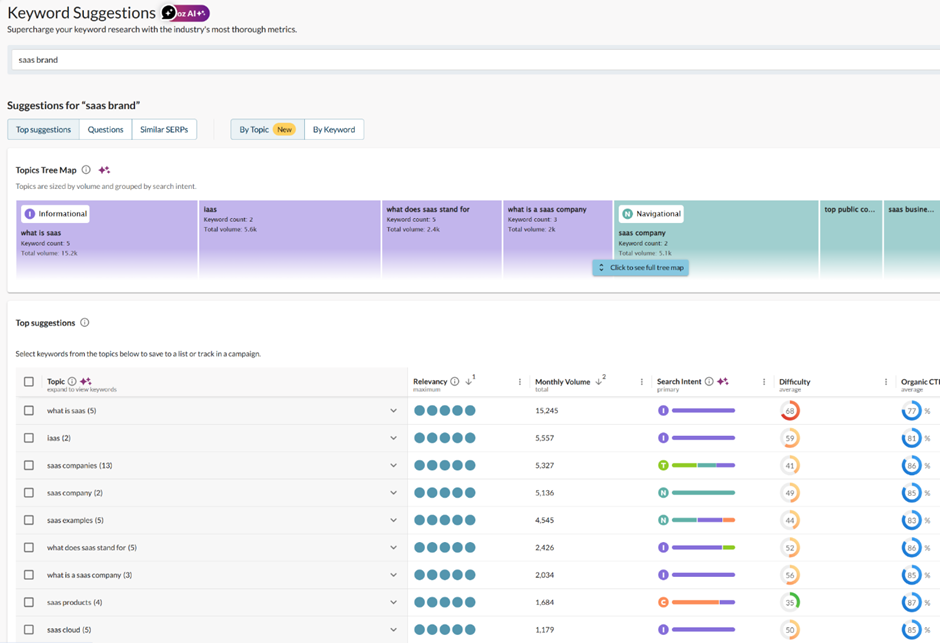
Notice how you can see search intent tags (like Informational, Transactional, Commercial) right next to your queries. Personally, I think this makes it really easy to map out your content strategy (plus it’s a great addition that Moz didn’t always have!)
I also like the color coordination, it kind of makes the whole setup visually appealing and fun to use.
Semrush’s Keyword Magic Tool still does more here, particularly across languages and with its SEO Content Template mapping out related semantic terms automatically, but Moz’s version is more than serviceable for day-to-day brief-building.
Keyword Lists
This one lets you group keywords together, track them against the same core metrics, and pull further suggestions for each list.
To test it out, I created a list “B2B SaaS SEO”, where I added a group of relevant keywords, and it generated simple metrics like total volume, and average difficulty.
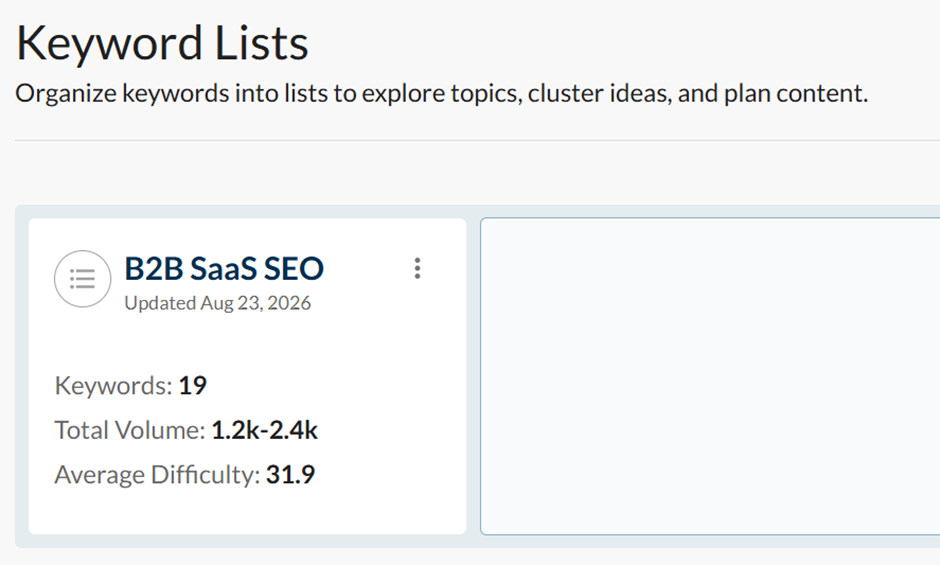
It’s functional, but not much beyond organizational. Semrush’s Keyword Manager and SE Ranking’s clustering tools both go further, building out ready-made topic clusters automatically.
Link Research
Moz includes a full Link Research tool, though it’s worth saying upfront that this isn’t the category it wins in anymore.
Ahrefs built its entire reputation on backlink data and still runs a noticeably larger index, so anyone whose work leans heavily on link building will likely want Ahrefs alongside or instead of Moz here.
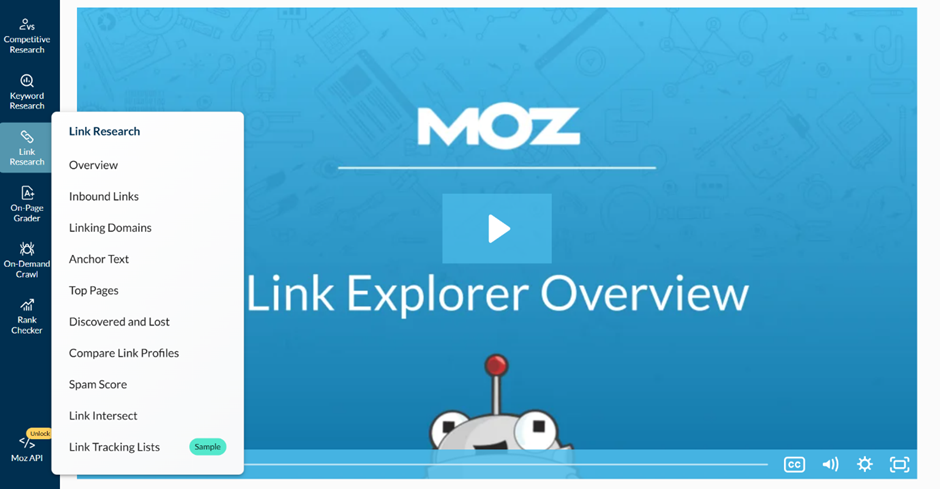
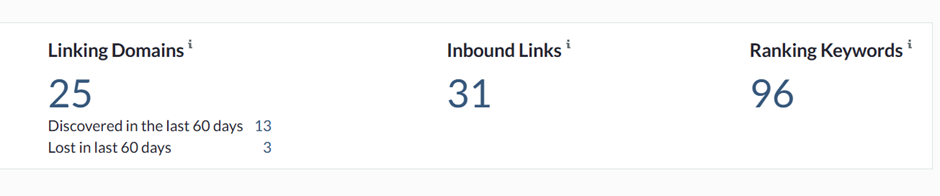
That said, the Overview tab inside Link Research is useful for a general read on a site’s backlink profile. It opens with linking domains and unique inbound links, then scrolling down gets you discovered and lost linking domains over time, plus a breakdown of both internal and external links.
Top anchor texts, top followed links, and the site’s top-linked pages round out the picture.
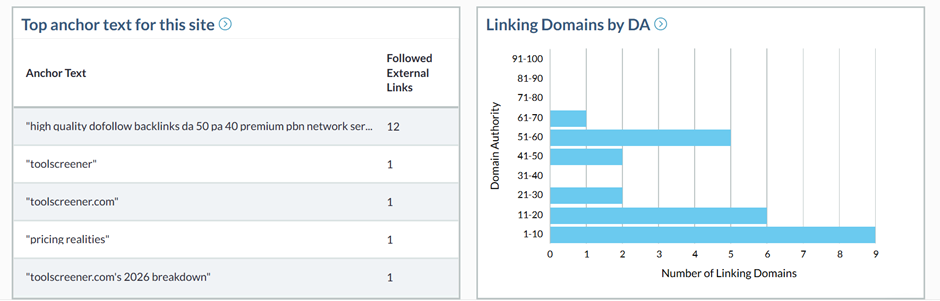
Having used Ahrefs recently for the same kind of backlink work, to be honest, I prefer it over Moz. The way Ahrefs structures its data just feels easier to dig through, plus it’s more thorough given that it has a much larger, faster-updating database than Moz.
Spam Score
This is Moz’s “answer” to what Semrush calls a Toxicity Score, and it flags the share of a domain’s backlinks that look low-quality or spammy.
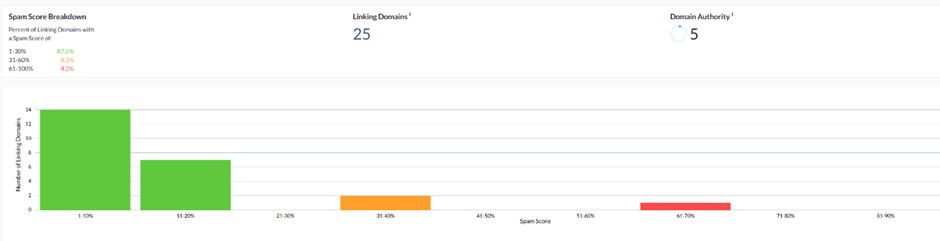
Ideally, I would have expected there was a dedicated Backlink Audit tool where toxic, non-toxic, and potentially toxic links get sorted out individually so you can act on a removal or disavow list.
Link Intersect
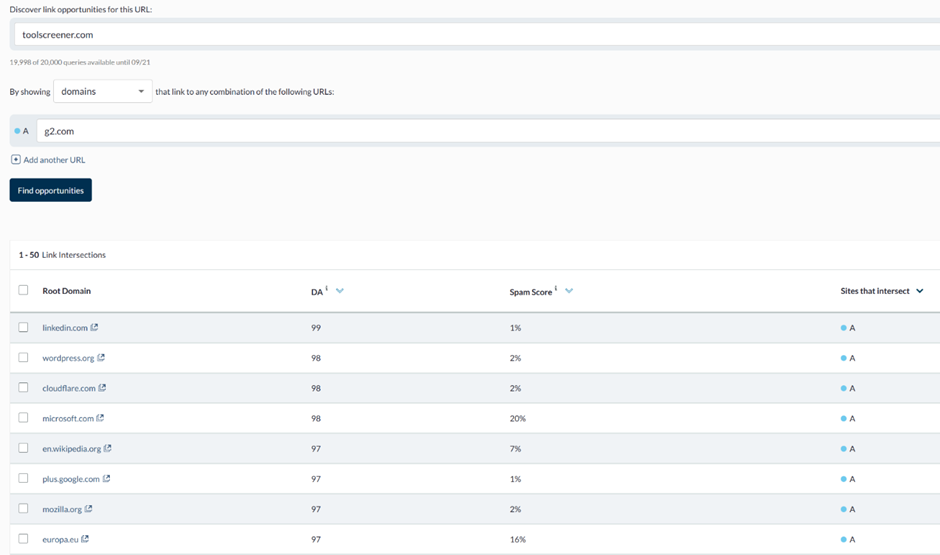
This is one of the strongest tools in the platform. When you enter your domain, and a few competitors, Moz shows you who links to them but not to you.
It’s a straightforward backlink gap tool, and one of the better reasons to have Moz Pro open during outreach planning.
Link Tracking Lists
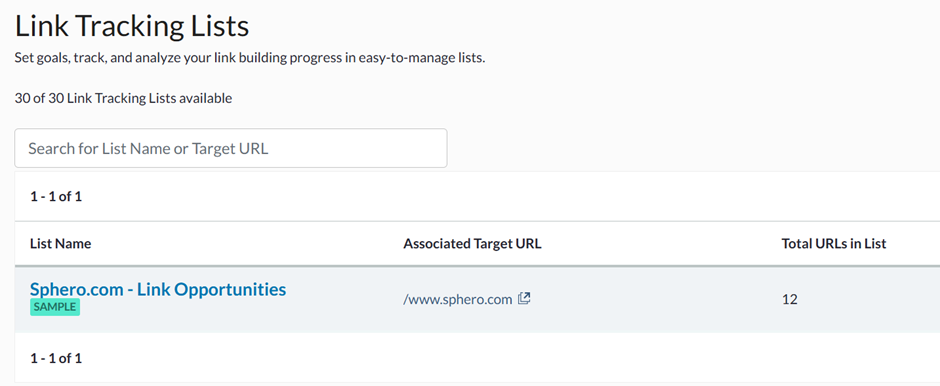
You build a list of up to 500 URLs alongside your own domain, and Moz checks whether those URLS are linking to you, sending a notification when one does. It’s a fine way to keep tabs on a specific batch of prospects or placements you’re expecting, but is not a tool most people will open often.
On-Page Grader
The On-Page Grader scores individual pages against a target keyword. You feed it the page and the keyword, and it comes back with the page’s meta description, keyword usage, and a full list of page factors split into what’s helping (shown in green) and what’s hurting (shown in red).
It also shows an overall Page Score from 0 to 100.
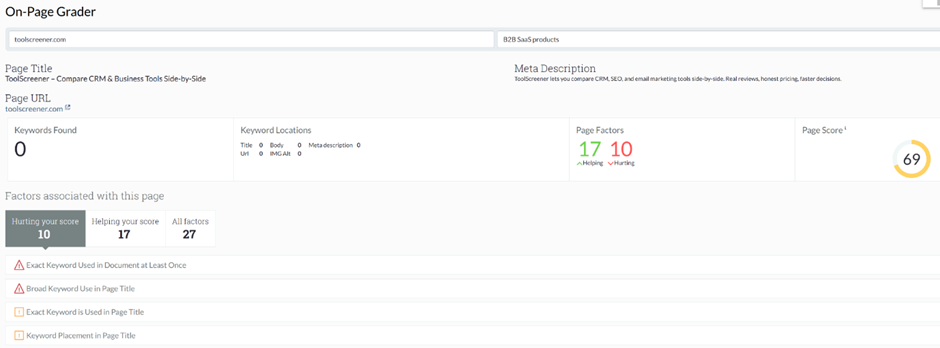
What I found interesting, is that each hurting factor expands into an explanation of how to fix it, which is useful. But at the same time, it’s great to know what’s working as well, so a writer can see what to repeat on the next page instead of only what to avoid.
On-Demand Crawl
Moz calls its full site audit tool On-Demand Crawl and it checks a site against issue categories. Think broken links, duplicate content, missing meta descriptions; the kind of audit you’d create for your client.
It then hands back a prioritized list ranked by how much each issue is likely hurting you. I got the full report via email a few minutes after requesting an audit.
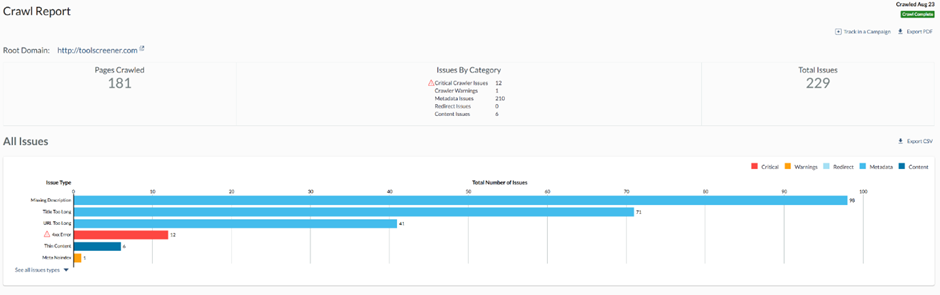
I liked how the issue explanations are written in plain language, simple enough for even a beginner to understand and act on. On top of that, Moz walks you through how to fix those issues, which makes the process so much easier for someone who is just learning SEO or needs to send a report quickly.
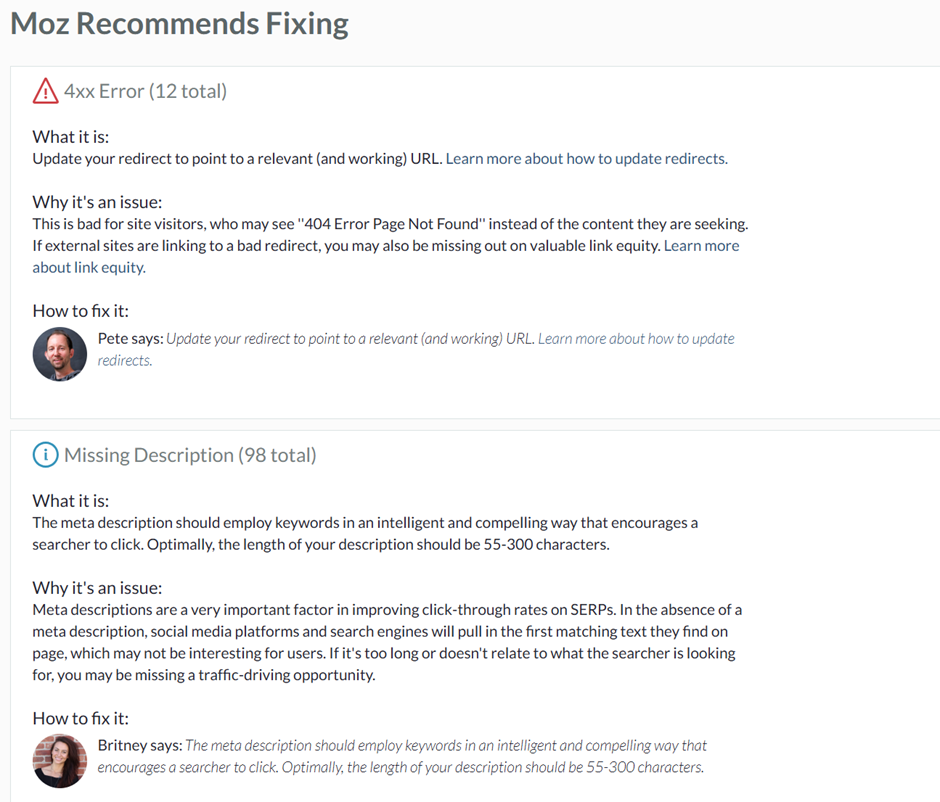
What could be a bit frustrating, is that larger domains can take up to an hour to fully crawl, so if time is your priority, that’s something to keep in mind.
Rank Tracking
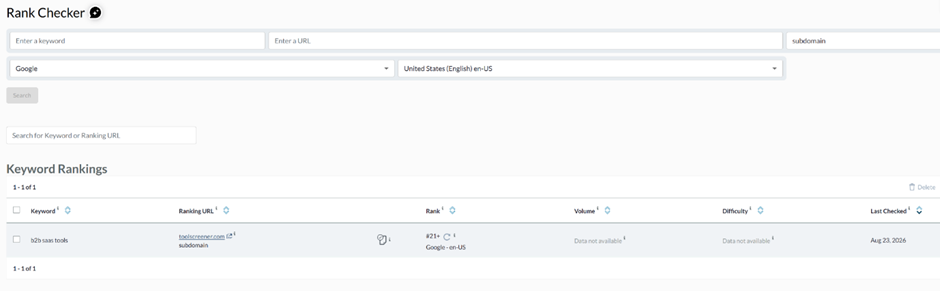
You add your target keywords and URLs. Choose from Google, Google Mobile, Yahoo, or Bing, pick a country, and hit Search. Moz tracks:
- Your rankings in Google over time
- Movement up/down by keyword
- Visibility vs competitors
Rank tracking is great for weekly reporting and explaining to stakeholders whether your SEO work is actually moving the needle.
On the flip side, Moz Pro updates its tracked campaign keyword rankings once per week, whereas other brands, like Semrush, and SE Ranking update rankings daily.
Local SEO (Moz Local – add-on)
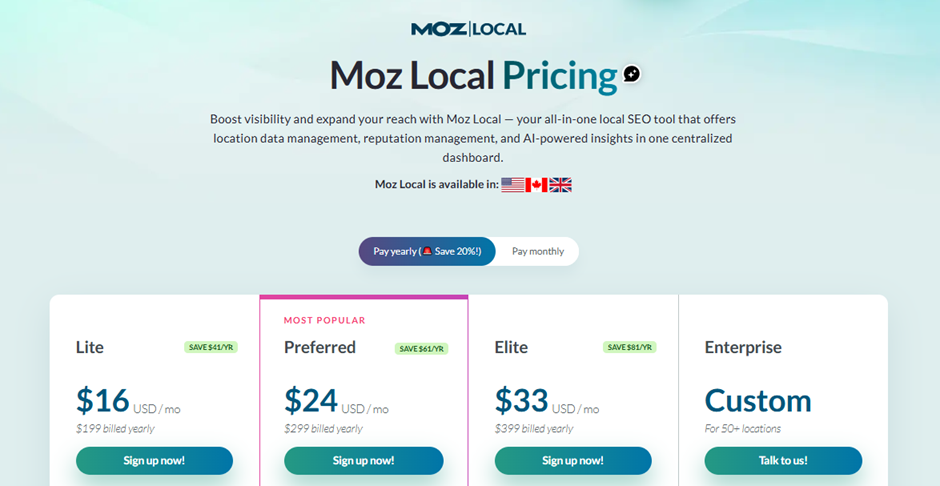
If you care about local search, Moz Local helps manage your business listings across directories. It’s not part of Moz Pro plan, so you’d have to pay extra for it.
Here are the pricing plans:
If you’re researching alternatives, check our Best SEO Tools for Marketers hub to see how each platform stacks up.
Moz’s Free SEO Resources and Learning Hub
On the resources side, Moz’s free content is still some of the best in the industry. The Beginner’s Guide to SEO, Moz Academy courses (although not all are free), how-to guides, and more, are where you can get real answers from other users.
Moz Customer Support Based on Users Experiences

Source: Magnific
When it comes to customer support, I stumbled across mixed reviews on Trustpilot. Some users report quick, professional help that resolves issues within days, while others describe slow, generic replies, and a few note support feels increasingly AI-handled rather than human once an issue gets complicated.
So, this is really a bit of a gamble; it comes down to your personal experience.
Moz Pricing, Plans, And Overall Value For Money
Here’s a simplified view of Moz Pro pricing (always double-check their official pricing page, as this can change):
Plan Typical Starting Price* Best For Key Limits Starter $49/mo Freelancers, small sites 1 user, 1 site, 50 keywords Standard $99/mo Small business owners 1 user, 3 sites, 300 keywords. Medium $179/mo Growing in-house teams, small agencies 2 users, 10 sites, 1,500 keywords Large $299/mo Agencies, larger in-house teams 3 users, 25 sites, 3,000 keywords
*Prices vary by billing cycle and promos: check Moz’s site for exact current numbers.
Moz Pro comes with four pricing tiers: Starter, Standard, Medium, and Large, plus a custom Enterprise option.
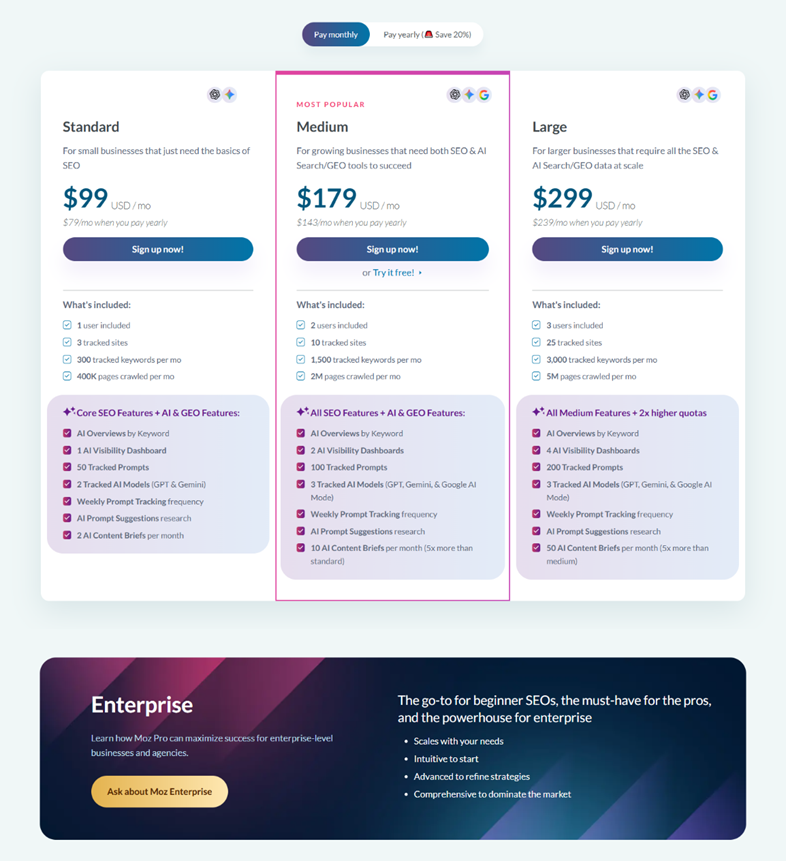
Annual billing saves you 20% on every tier, which is more than Semrush and Ahrefs (which save you 17% yearly). Moz free trial is available on the Medium plan for anyone who wants to test the full feature before committing.
The good news is, almost every tier now bundles in Moz’s AI and GEO features too, so you’re no longer paying extra just to see how your brand shows up inside ChatGPT, Gemini (or Google’s AI Overviews in the Medium and Large plans).
However, the bad news is you need to pay extra if you need additional AI visibility dashboards ($20 each) or additional prompts tracked ($50 per 100 prompts).
Now let’s go into more depth on pricing.
The Starter plan opens things up at $49/month billed monthly and is best for individuals managing a single website. You get access to AI research and SEO tools, along with basics like MozBar and industry-leading data.
The base Moz Pro price of $79/month is for the Standard plan, billed annually (when paid month to month, it’ll cost you $99). This is the entry point for small businesses that need the fundamentals beyond Starter.
You get 1 user seat, 3 tracker sites, 300 tracked keywords per month, and 400,000 crawled pages per month. On the AI side, Standard includes AI Overviews by Keyword, one AI Visibility dashboard, and 50 tracked prompts across two AI models (ChatGPT and Gemini).
The $143-per-month Medium plan, billed annually ($179 month-to-month), is Moz’s most popular tier and the more realistic choice for small to midsize businesses. It bumps you to two user seats, 10 tracked websites, 1,500 tracked keywords per month, and 2 million crawled pages per month. The AI allowance roughly doubles too.
The Large plan costs $239 per month, billed annually ($299 billed month to month), and is the best fit for businesses and agencies running SEO and AI visibility tracking at a bigger scale. It comes with 3 user seats, 25 tracked sites, 3,000 tracked keywords per month, and 5 million crawled pages per month.
As you can imagine, AI allowances double again over Medium. Research limits scale up too, topping out at 15,000 keyword queries and 70,000 backlink queries a month.
Moz Enterprise is available upon request; you have to submit a form in order to get required pricing details.
If you’re comparing Moz Pro against other SEO platforms, it helps to see pricing tiers and feature limits side-by-side instead of jumping between vendor pages. You can explore a broader SEO tools comparison to understand how similar platforms stack up.
How to think about value
Moz Pro is not the cheapest option, but if you:
- Use keyword research weekly
- Rely on site audits to keep your site clean
- Need ranking reports for clients or leadership
- Prefer a user-friendly and simple-to-use tool
…then the cost can easily pay for itself in a single decent content win or technical fix that boosts traffic.
If you’re only doing occasional SEO on a side project, though, the price might feel heavy, and cheaper or even free tools plus manual work might be enough.
Moz Pro vs Other SEO Tools: How It Stacks Up
When you’re comparing Moz Pro alternatives, you’re usually looking at Ahrefs, Semrush, and maybe lower-cost tools like SE Ranking or Mangools.
Here’s a quick side-by-side to frame things:
Tool Core Strengths Typical Cost Level Best For Moz Pro Data integrity, usability, education Mid–High Teams wanting reliable, accessible SEO Ahrefs Backlink data, long-tail keywords High Power users, link builders, advanced SEO Semrush All-in-one marketing suite (SEO + PPC) High Performance teams, agencies, multi-channel SE Ranking Budget-friendly, broad feature coverage Low-Mid Small teams on a budget
In practice:
- Choose Moz Pro if you value clean UX, trustworthy metrics, and teaching non-SEOs how to work with SEO.
- Choose Ahrefs if your work is heavily link-building or competitor intel-focused.
- Choose Semrush if you want SEO + PPC + competitive research + content marketing in one place.
- Choose SE Ranking/Mangools if you’re budget-conscious but still need a decent feature set.
If you’re already deep into another tool, Moz Pro isn’t usually a “switch everything over” move. It’s more often chosen as the first serious SEO platform for teams upgrading from free tools and spreadsheets.
Where Moz Pro Delivers Real Value

Here’s where Moz Pro tends to pull its weight.
1. Data you can actually trust
One thing users consistently praise: Moz doesn’t inflate numbers. Search volumes and difficulty scores tend to be conservative and realistic rather than ego-boosting. That matters when you’re building business cases and forecasts.
2. Making SEO accessible to non-specialists
If you’ve ever tried to onboard a content writer or CMO into a clunky SEO tool, you know the pain. Moz Pro’s interface is:
- Clean and logical
- Light on jargon
- Backed by excellent guides and tooltips
That makes it great for cross-functional teams where not everyone is an SEO expert.
3. Day-to-day execution and reporting
For most teams, the weekly rhythm looks like:
- Check ranking movements
- Review new crawl issues
- Update content plans from keyword research
- Pull a simple report for stakeholders
Moz Pro is strong at that “Monday morning SEO check-in” workflow. You’re not fighting the tool to get basic insights out.
4. Consolidating multiple tools
Instead of stitching together separate tools for rank tracking, keyword research, and site audits, Moz Pro gives you a single login, single bill. If you’re a lean team, that alone can justify the cost.
5. Learning while doing
Moz has always leaned into education. Inside the product you’ll find explanations of why an issue matters and how to fix it, which is perfect if you’re still leveling up your SEO skills or training junior teammates.
Where Moz Pro Falls Short
Moz Pro isn’t perfect, and you should be clear on the trade-offs.
1. Rank tracking speed
Standard Moz Pro plans only update rankings weekly. If you’re running fast-paced campaigns, migrations, or heavy testing, that delay can be frustrating.
2. Long-tail & niche keyword depth
For broad, commercial terms, Moz is great. For hyper-specific long-tail keywords, competitors like Ahrefs and Semrush usually surface more ideas and deeper SERP data.
3. Local SEO depth
Moz Local is solid for listing management, but if local is your entire business, specialized tools (like BrightLocal or Whitespark) can go further with reviews, citations, and local SERP detail.
4. Learning curve for complete beginners
The interface is friendly, but Moz Pro is still a full SEO suite. If you’ve never touched SEO tools before, expect to spend some time in their guides before everything clicks.
5. Price-to-depth ratio
You’re paying for quality data and polish. But if you’re a very advanced SEO, you may feel you’re paying close to Ahrefs/Semrush money without quite the same depth.
Final Thoughts on Moz Pro
Moz Pro is very much “SEO for real-world teams” rather than “SEO for hardcore data nerds only.” Simply put:
Moz Pro is a good fit if you’re:
- A marketing manager or content lead who needs SEO capabilities but isn’t living in spreadsheets all day.
- A growing business or in-house team that wants a reliable, shared SEO toolkit.
- A small agency or consultant managing multiple sites and needing clean reporting.
- A mid-level SEO who values trustworthy metrics and a sane interface.
You’ll like Moz if you care about:
- Clear, understandable metrics
- Actionable recommendations
- Teaching less-technical teammates how SEO works
Moz Pro is not ideal if you’re:
- On a very tight budget (early freelancers, small side projects).
- Obsessed with real-time rank changes and hyper-granular SERP data.
- Doing heavy technical SEO at enterprise scale and need log file analysis, custom dashboards, etc.
- A power user of Ahrefs or Semrush who lives for the deepest possible backlink and competitive intel.
In those cases, Moz Pro might feel a bit “lightweight,” even though it’s solid at what it does.
Frequently Asked Questions
Is Moz Pro legit or overhyped in 2026?
As seen in this Moz Pro review, the platform is legit in 2026, but it’s not the most advanced or feature-stacked SEO platform anymore. Its strengths are trustworthy data, user-friendly UX, and solid fundamentals—keyword research, rank tracking, site audits, and backlinks.
But if you need the most advanced, real-time competitive intel money can buy, it’s not the strongest pick at this price point anymore.
Is Moz Free?
Moz offers some tools for free, but access to the full Moz Pro suite requires a paid subscription, starting at $49/month for the Starter plan.
Who is Moz Pro best suited for?
Moz Pro is best for marketing managers, content leads, small agencies, and in-house teams who need reliable SEO fundamentals without drowning in complexity.
It’s particularly helpful for cross-functional teams, because the interface, metrics, and built‑in education make it easier for non-SEO specialists to collaborate and understand recommendations.
What are the main pros and cons of Moz Pro?
Key pros: clean interface, trusted metrics like Domain Authority, strong keyword research and site audits, and clear, actionable recommendations plus educational resources.
Main cons: pricing can feel steep for freelancers, weekly (not daily) rank tracking on standard plans, less depth for obscure long-tail keywords, and lighter competitive and local SEO data than top-tier rivals.
Is Moz Pro worth the price for small teams or freelancers?
Moz Pro can be worth the price if you’re using keyword research, site audits, and ranking reports every week, since a single strong content win can offset the cost. However, early-stage freelancers, side projects, or very small sites may find the investment high compared with cheaper or free SEO tools.
How does Moz Pro compare to Ahrefs and Semrush?
Compared to Ahrefs and Semrush, Moz Pro focuses more on data integrity, accessible UX, and education than on maximum depth. Ahrefs usually wins for backlink data and long-tail keyword coverage, while Semrush is stronger as an all-in-one SEO and PPC suite. Moz Pro shines as a first serious, team-friendly SEO platform.
Is Moz Pro good for beginners learning SEO?
Moz Pro is a strong choice for beginners who are serious about learning SEO. While there’s still a learning curve, the interface is relatively intuitive, and the platform integrates explanations, guides, and tooltips.
This helps new users understand why issues matter and how to fix them while actively working on real projects.